
AI Resume Cover Letter: Turn Your Resume Into a Cover Letter That Gets Interviews
An AI resume cover letter starts with two inputs — your resume and a job description — and an AI cover letter generator drafts a tailored letter from them in seconds, so you customize every application instead of staring at a blank page. If you want the fastest path, an AI cover letter from your resume reads what you already wrote and reshapes it for the role in front of you.

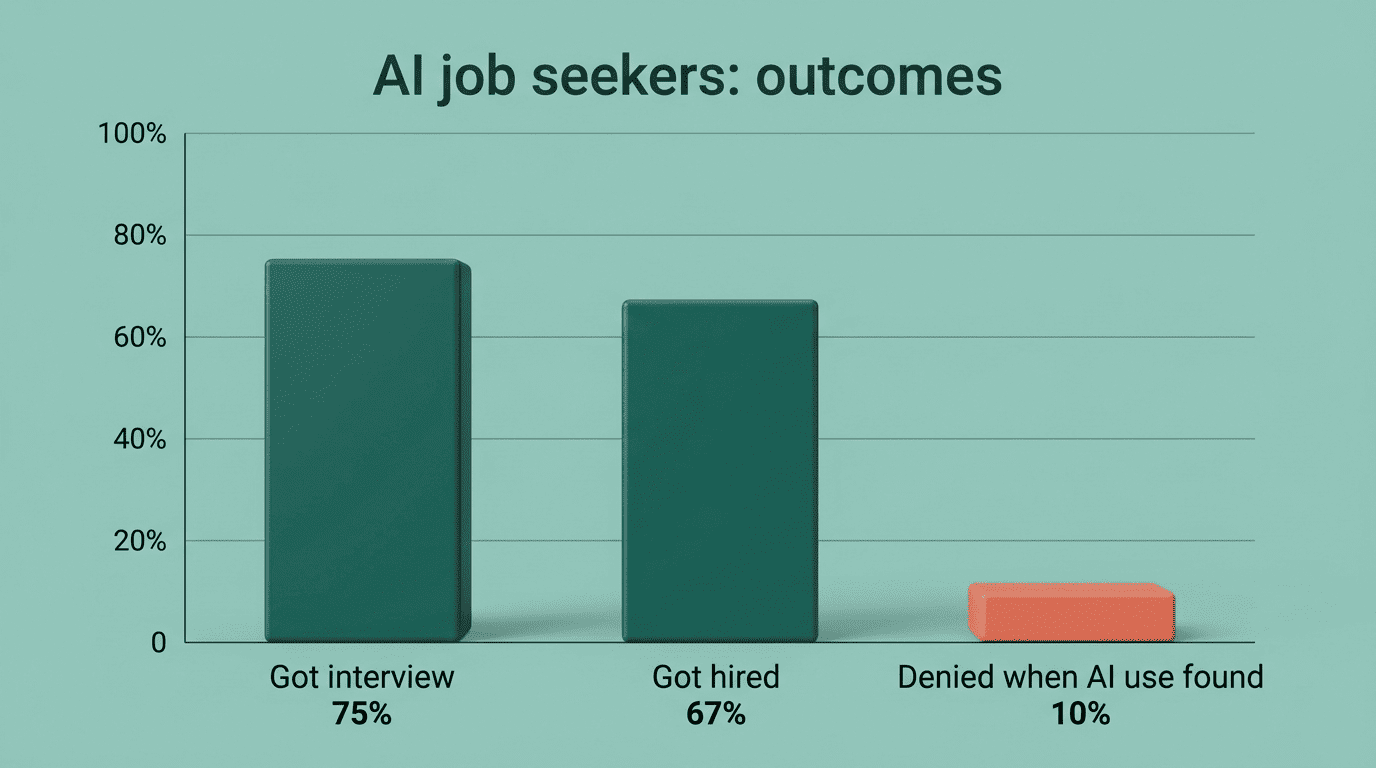
Done well, this is a genuine edge. Career data published by the Government of Alberta reports that 3 in 4 job seekers who used AI got invited for an interview, and 2 in 3 got hired. Done carelessly, the same tool produces a generic letter that hurts you — this guide covers both sides.
What an AI resume cover letter actually is
An AI cover letter generator takes your resume and the target job description and maps your experience onto the role’s requirements. It is not a template filler that swaps a name and company — it reads the skills and accomplishments in your resume and argues why they fit this specific job. Most tools accept a resume in PDF, DOCX, or TXT and pull the relevant details automatically.
The output follows a proven shape. A standard cover letter runs 250 to 400 words on a single page in three paragraphs: a hook, a section matching your experience to the requirements, and a short closing. That structure is small on purpose — a recruiter should read it in under a minute.
The letter is only ever as strong as the resume behind it. If your resume is thin or unfocused, the AI has little to work with, so it helps to start from a clean, complete resume built with an AI resume builder before you generate anything.
How the AI reads your resume
Tools extract your work history, skills, and titles from the uploaded file and treat them as the raw material for the letter. The better generators also use the job description as a second input, so the draft speaks to the role rather than describing you in a vacuum.
Under the hood these are large language models — Kickresume, for example, generates its drafts with GPT-4. That is why the same resume can produce very different letters depending on the job description and the tone you request.
How to generate a cover letter from your resume
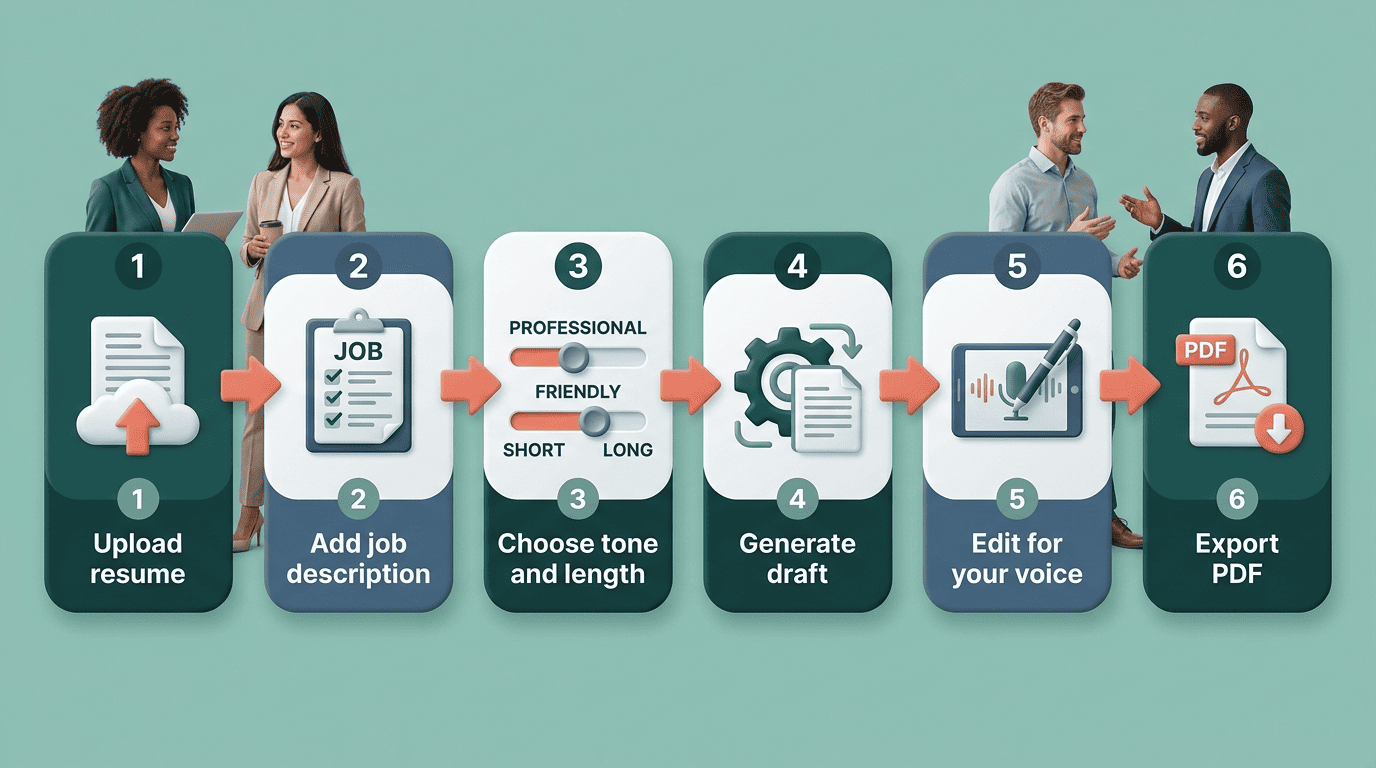
The workflow is consistent across the major generators. Follow these steps to go from resume to finished letter:
- Upload or drag-and-drop your resume so the tool can extract your experience.
- Enter the job title and paste the full job description.
- Choose a tone — casual, professional, or formal — and a length: short, medium, or long.
- Generate the first draft.
- Edit it for accuracy and your own voice.
- Export as a PDF and attach it to your application.
The whole process takes a few minutes, which matters when the average candidate applies to more than 200 jobs over roughly six months before landing a role. Speed is the point — but the editing step is where a good letter separates from a generic one.
| Input | What it controls | Why it matters |
|---|---|---|
| Resume | Your experience and skills | The factual base of every claim |
| Job description | Keywords and requirements | Tailors the letter to the role |
| Tone setting | Voice and formality | Matches the company culture |
| Length setting | Word count and depth | Keeps the letter to one page |
Give the AI the right prompt
The quality of the draft depends on what you feed the model. The Massachusetts Institute of Technology’s career office advises giving the AI three things: your resume, the job description, and information about the company such as its mission, values, and history, so the letter can connect your background to what the employer actually cares about.
A strong prompt also tells the AI what to prioritize. Ask it to match your top two or three accomplishments to the role’s stated requirements, rather than summarizing your entire resume. Specific instructions produce specific letters.
Get past the ATS: the keywords that matter
Before a human reads your letter, software often screens it. Many employers use an Applicant Tracking System (ATS) to scan applications for keywords, and Harvard’s career office notes this is especially common for roles that receive high application volumes. If the letter and resume miss the terms the job posting uses, they can be filtered out before anyone sees them.
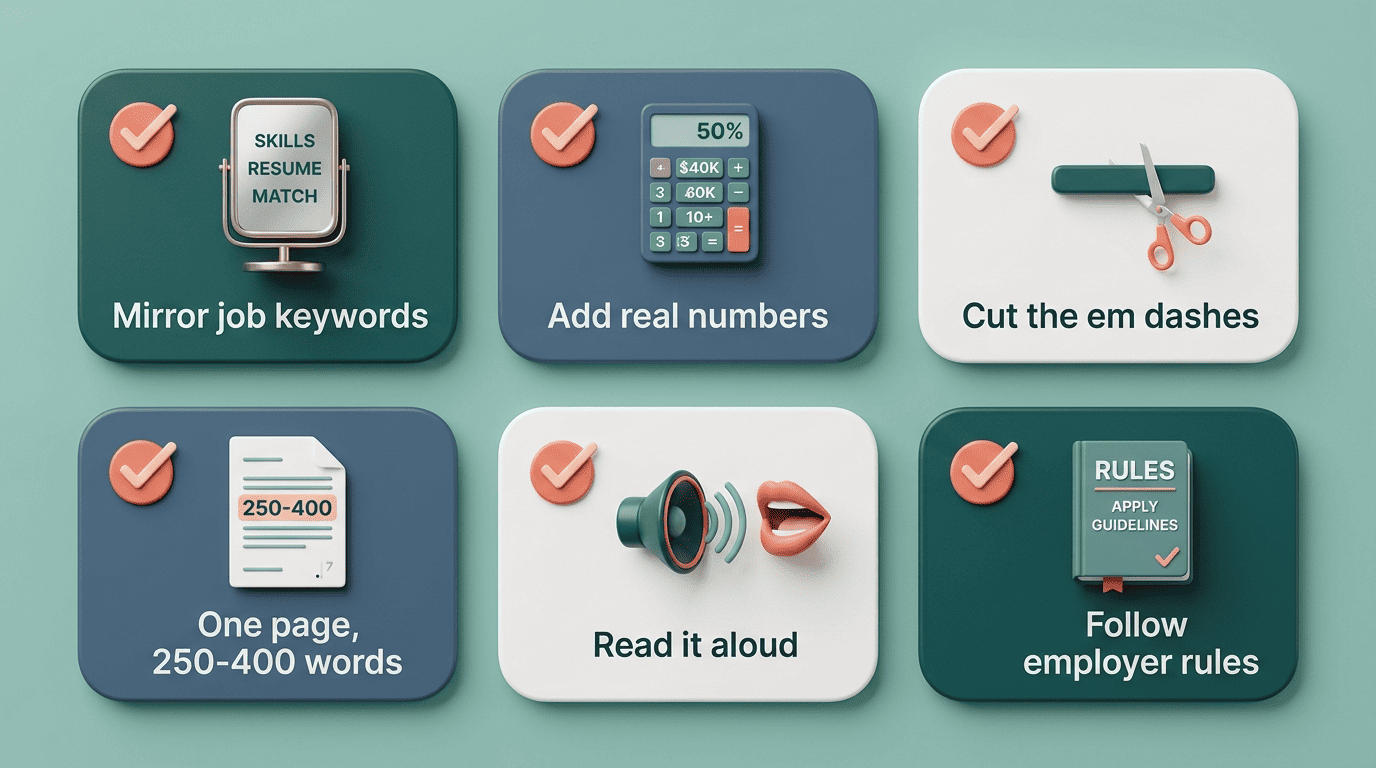
This is where AI is genuinely strong. It reads the job description and surfaces the exact phrasing an employer expects — the same discipline you apply when you check your resume against the ATS before you apply. Mirror the language of the posting for real skills you hold, and let the AI check that nothing important is missing.
Make it sound like you, not like a robot
The biggest failure mode of AI cover letters is generic output. Harvard’s Mignone Center for Career Success is blunt about the risk:
Generative AI should not be the primary author—not least because its output will likely be very generic.
Harvard FAS Mignone Center for Career Success
Recruiters can also recognize unedited AI writing. MIT’s career advisors point out the tells: an overuse of em dashes, a formulaic structure, and prose that is over-polished in a way real people rarely are. The model also lacks context about you, so it can oversell your abilities or invent claims you can’t back up.
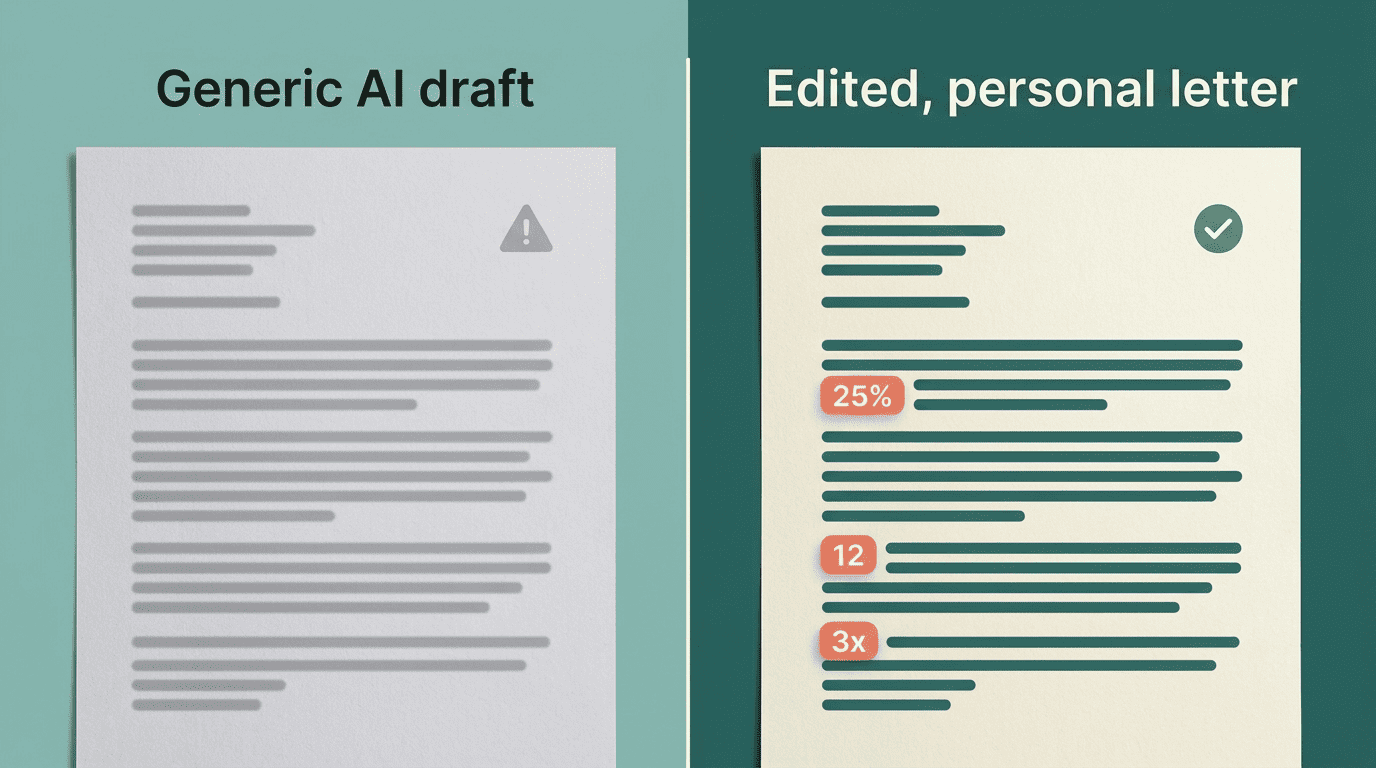
The fix is editing with intent. Before you send the draft, work through a short pass:
- Replace vague statements with specific accomplishments and real numbers.
- Cut the em dashes and any phrase that sounds borrowed.
- Add one sentence about why this company, drawn from its mission or work.
- Read the whole letter aloud to catch anything that isn’t yours.
As MIT puts it, your cover letter is your chance to connect the dots for an employer, and «that story needs to come from you.»
Is it okay to use AI for a cover letter?
Yes — as an assistant, with two firm rules. The first is honesty. Never let AI invent experience, titles, or results you don’t have. The Government of Alberta’s careers guidance notes that roughly 1 in 10 applicants were denied a job when their AI use was discovered, usually because the material was inaccurate or misleading. AI that helps you articulate real strengths is fine; AI that fabricates is a liability.
The second rule is to follow employer instructions. Some organizations set explicit policies on whether AI can be used in application materials, so read the posting carefully. An AI resume assistant is a drafting and editing tool — the judgment, the honesty, and the final voice stay with you.
It helps to know what AI is good at and where it falls short before you lean on it:
| AI does this well | AI struggles with this |
|---|---|
| Surfacing keywords from the job description | Knowing which of your wins matter most |
| Producing a clean first draft fast | Career gaps and non-traditional paths |
| Checking grammar and structure | Avoiding generic, interchangeable phrasing |
| Matching tone to a role | Facts it was never given — it may invent them |