
AI Resume Interview Prep: Turn Your Resume Into a Personalized Practice Plan
The fastest way to walk into an interview ready is to let your own resume drive the practice. That is exactly what AI resume interview prep does — an AI resume assistant reads your resume and the target job, then generates the exact questions you are likely to face and coaches your answers.

A job interview is still won on preparation; AI just makes that preparation personal, on-demand, and measurable. Below is how the mechanics work, a step-by-step workflow, and how to tell a genuinely useful AI interview coach from one that just recycles a generic question bank.
What Is AI Resume Interview Prep?
AI resume interview prep uses an AI interview assistant that parses your resume and a specific job description to simulate interviews, generate tailored questions, and give feedback on your answers. Unlike a static bank of «top 50 interview questions,» it is personalized to your actual experience — the projects you shipped, the gaps in your timeline, the tools listed on your resume.
A definition in one line
At its core, an AI interview copilot combines resume parsing with question generation: it reads what you’ve done, cross-references it against what the role requires, and produces a question set built around the overlap and the gaps. The output is closer to a hiring manager’s private notes than a generic interview guide, because it starts from your resume rather than from a template.
An AI resume assistant built for this workflow typically bundles resume parsing, question generation, and a mock-interview mode into one tool, so you move from upload to practice session without switching apps.
Why «resume-driven» matters
Ordinary interview prep means googling «top 50 interview questions» and hoping some of them come up. Resume-driven prep instead asks about your specific bullet points — the exact project, the number you claimed, the year-long gap on your timeline. Recruiters increasingly favor role-specific knowledge over rehearsed general answers, a pattern Resumly’s guide on AI interview planning attributes to LinkedIn hiring data — worth treating as a vendor-cited claim rather than an independently verified statistic.
Practicing against your own resume also surfaces the questions you’re least prepared to answer, which is usually more useful than rehearsing questions you’d answer well anyway.
How AI Reads Your Resume and Builds Questions
Before it can ask a useful question, the system has to understand what’s actually on the page — not just job titles, but the skills, tools, and outcomes buried in each bullet.
Three stages of resume parsing
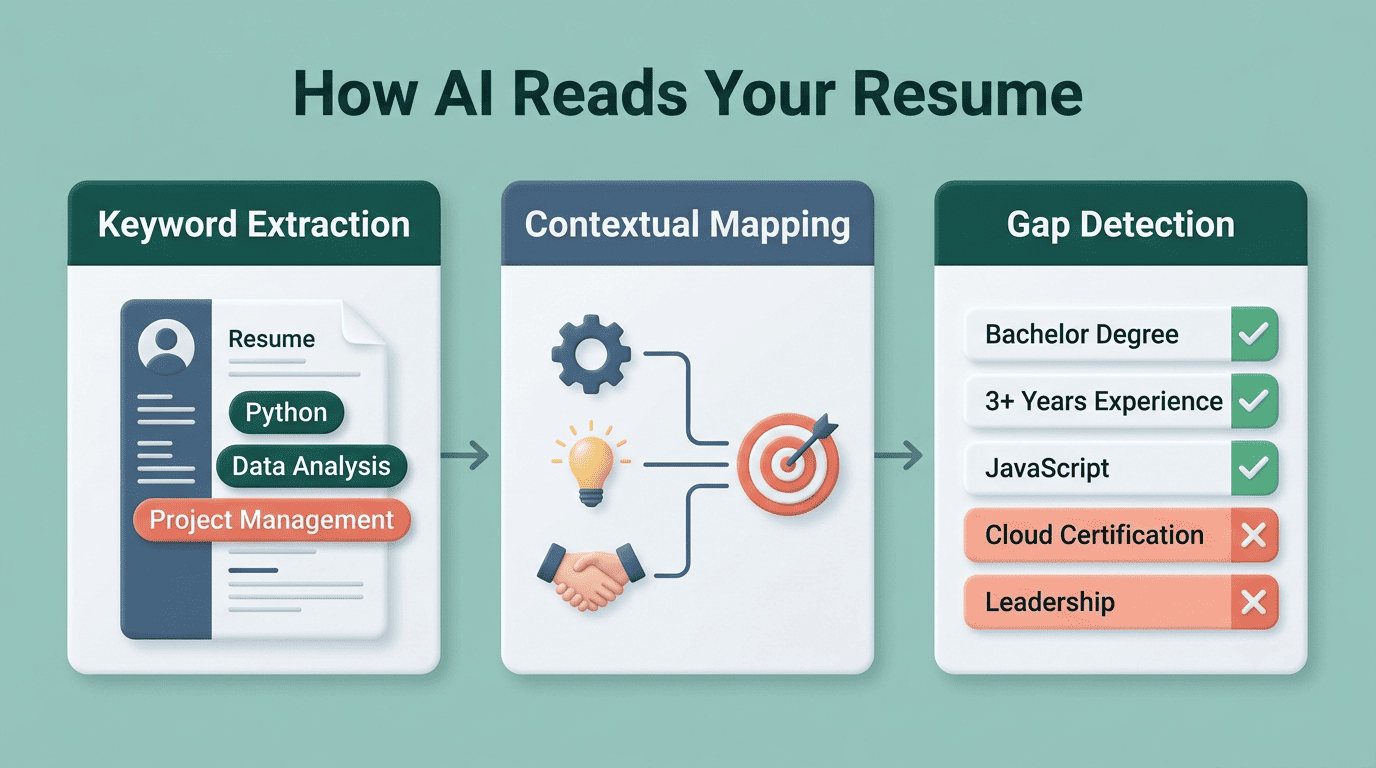
Most AI resume tools break the parsing step into three layers:
- Keyword extraction — pulling hard skills, soft skills, certifications, and measurable results out of the raw text
- Contextual mapping — matching those extracted terms against the competencies the target role actually requires
- Gap detection — flagging skills the job wants that your resume doesn’t clearly show
The result is a skill-profile matrix that the question generator draws from — this is how the process is generally described by AI resume-prep services, not an industry-standardized method. It’s also why a messy, image-heavy resume produces worse questions than a clean, text-based one: the parser can only work with what it can read.
From matrix to questions
That matrix, combined with the job description, feeds a competency-based and behavioral question set, plus follow-up questions that adapt based on how you answer. All of this runs on top of large language models — the same underlying technology as GPT, Claude, and Gemini — which is why the questions read as natural language instead of a fill-in-the-blank template.
Before you start generating questions, it’s worth checking that your resume itself will clear the first filter: an AI resume ATS check confirms the parsing layer can actually read your document the way a real applicant tracking system would.
Step-by-Step: Prepping With an AI Resume Assistant
A full prep cycle usually takes under an hour and follows the same four-step loop regardless of which tool you use.
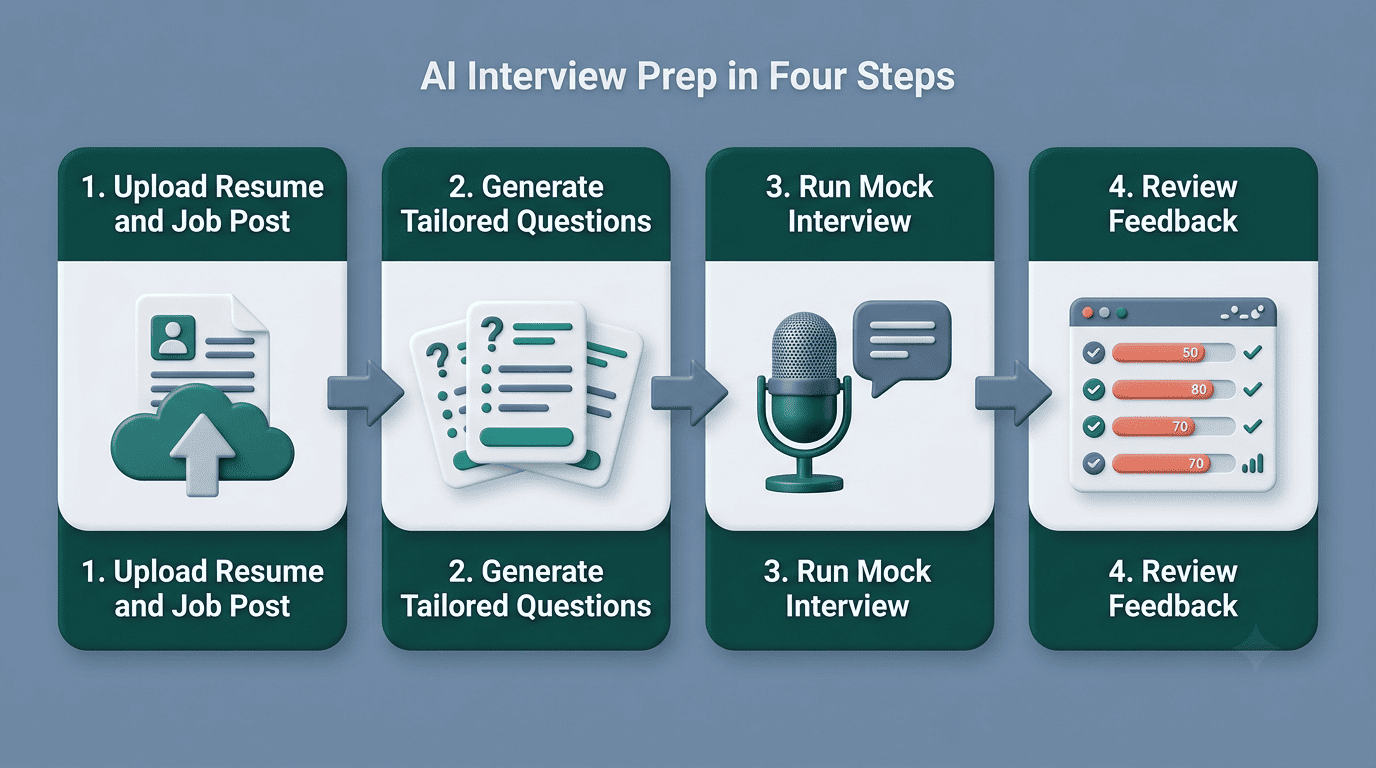
- Feed it your resume and the job post. Upload your resume and paste in the job description so the AI can find the overlaps and the gaps. Keep your resume in clean, plain text where possible — heavy formatting can confuse the parser. A tight AI resume summary at the top also gives the parser a clearer signal of your headline strengths before it digs into the bullet points.
- Generate a tailored question set. Ask for behavioral questions, technical or role-specific questions, and a few that probe the gaps in your resume. Working through your prompts in order so each one builds on the last — the approach ResumeCoach recommends for AI interview-prep prompts — tends to produce a more realistic practice run than a random mix.
- Run a mock interview. A full AI mock interview typically runs 15-30 minutes through a loop of question, your spoken or typed answer, instant feedback, and repeat. Match the session length to the real interview format — phone screens often run 15 minutes, first-round video calls closer to 30, and onsite loops an hour or more.
- Review feedback and iterate. The AI scores your answer on clarity, depth, confidence, and structure, transcribes it, and often suggests a stronger model answer. Re-run the questions where you scored weakest until the answer feels clean, not memorized.
Master the STAR Method With AI
Behavioral questions («Tell me about a time when…») reward a specific structure, and AI tools lean on it heavily when turning resume bullets into practice answers.
What STAR stands for
The STAR method is a framework for structuring behavioral interview answers around four parts:
| Letter | Stands for | What you cover |
|---|---|---|
| S | Situation | The context — where, when, what was at stake |
| T | Task | Your specific responsibility in that situation |
| A | Action | The concrete steps you took, not the team’s |
| R | Result | The measurable outcome, ideally with a number |
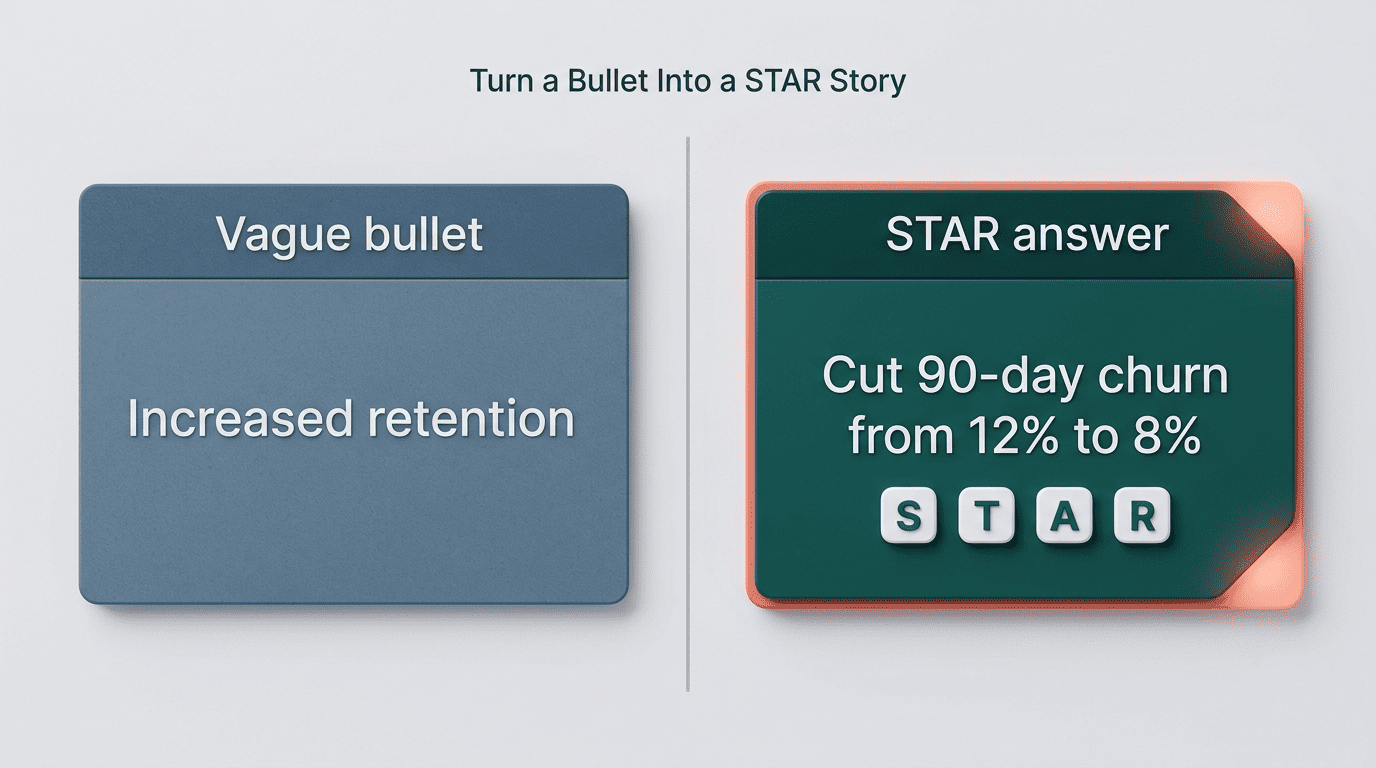
An AI interview coach takes a bullet point from your resume and prompts you to expand it into a full STAR story, pushing for a measurable result where your original bullet was vague.
Turn resume bullets into STAR stories
Take a bullet like «increased retention.» An AI mock interview will typically ask you to fill in the Situation (what team, what product), the Task (what you were responsible for), the Action (what you specifically did), and then push hard for a Result with an actual number attached. A bullet that stays at «increased retention» in the interview room reads as unprepared; one that becomes «cut 90-day churn from 12% to 8% by rebuilding onboarding emails» reads as evidence.
The U.S. Department of Labor’s CareerOneStop resource frames preparation itself as the differentiator between candidates:
Feeling anxious during job interviews is common, but being well prepared can greatly improve your performance.
CareerOneStop, U.S. Department of Labor
That’s the same logic an AI interview copilot automates: instead of guessing which questions to prepare for, it derives them directly from your resume and the posting.
Mock Interviews and Real-Time Feedback
A voice or conversational mock interview mode tries to reproduce some of the pressure of a live panel — adaptive follow-up questions, a soft time limit, and no way to pause and rewrite your answer. Some tools go further and offer a copilot mode that runs live inside Zoom, Google Meet, or Teams, whispering suggested talking points during an actual call; the ethics of that mode are worth thinking through separately, covered below.
The feedback that follows a practice answer usually breaks down along a few consistent axes:
- Communication clarity — whether the answer was easy to follow or rambled
- Content depth — whether you gave specifics or stayed generic
- Confidence — pacing, filler words, hedging language
- Answer structure — whether it followed something like STAR or wandered
This kind of feedback is genuinely useful for catching patterns you can’t hear in your own head, but it has real limits: the AI doesn’t read body language, doesn’t know the interviewer’s personal preferences, and can’t replace the judgment of someone who has actually sat on the other side of the table.
Limits and Ethics: Is Using AI «Cheating»?
Practicing with an AI tool before an interview and using one during an interview are two very different things, and conflating them is where most of the ethical debate starts.
AI doesn’t read the room. It can’t see body language, can’t sense when an interviewer is testing for culture fit rather than technical accuracy, and occasionally «hallucinates» facts about a company that aren’t true — always verify anything it tells you about the employer independently.
Vendor performance claims deserve skepticism. Marketing lines like «95% interview success rate» or «trusted by millions of job seekers» come from the vendors themselves and are not independently audited; treat them as sales copy, not evidence, when comparing tools. A few patterns are worth watching for specifically:
- A headline success-rate statistic with no methodology or sample size disclosed
- User counts that can’t be traced to any public source
- No free tier to actually test the parsing quality before paying
- No explanation of how «adaptive» follow-up questions actually adapt
Prep and live assistance sit on opposite sides of the line. Training with AI before an interview is no different from using flashcards or a study guide — it’s universally accepted. Running a hidden live copilot during the actual interview is a different matter: many employers explicitly prohibit it, and getting caught costs you more trust than a weak answer ever would. The safer approach is to use AI to prepare thoroughly, then walk into the interview and answer as yourself.
How to Choose an AI Interview Prep Tool
Not every tool marketed as an «AI interview coach» actually does the parsing work well — some just repackage the same generic question bank behind a chat interface.
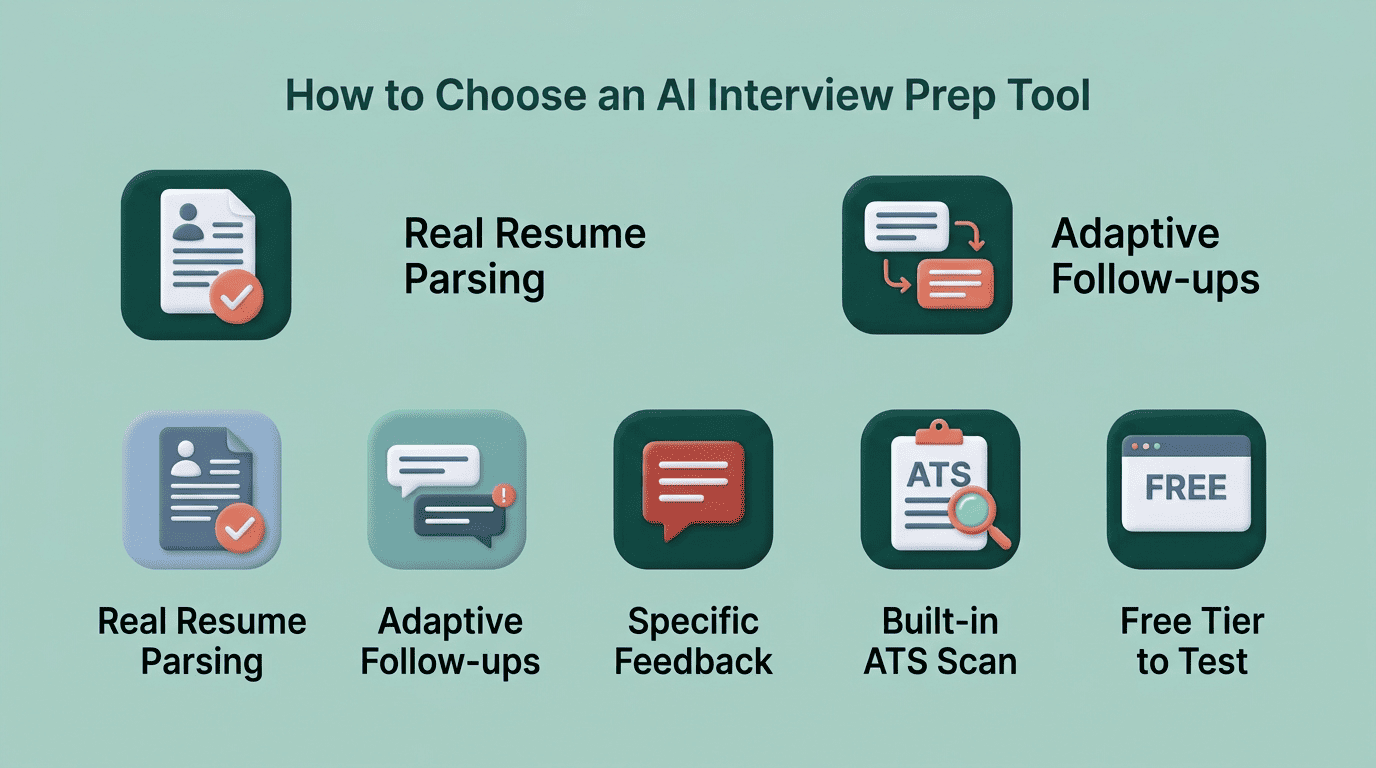
| What to check | Why it matters |
|---|---|
| Real resume parsing, not just job title matching | Determines whether questions are actually personalized |
| Adaptive follow-up questions | Signals a genuine conversational mock interview, not a scripted quiz |
| Specific feedback, not just «good job» | Tells you what to actually fix before the real interview |
| Built-in ATS resume scan | Confirms your resume clears automated screening too |
| A usable free tier | Lets you judge quality before committing to a paid plan |
Match the tool to your goal
If you’re early in your career, prioritize a tool that leans into behavioral questions and STAR coaching — you likely have fewer flagship metrics to lean on, so the coaching on how to frame smaller wins matters more than technical depth.
If you’re an experienced or technical candidate, look for role-specific and system-design-style questions rather than generic behavioral prompts; a generalist tool will waste your practice time on questions you’ve already outgrown.
If you’re switching fields, gap-detection matters most: a tool that flags which required skills your resume doesn’t yet show helps you decide what to address head-on in the interview rather than hope it doesn’t come up. From there, trying an AI resume assistant end to end — resume, questions, mock interview, feedback — is the fastest way to see whether a given tool actually fits how you prepare.